
The Definitive Guide to Facial Redaction: Protecting Biometric Privacy in Digital Assets
Human faces are classified as unique geometric biometric identifiers under modern data privacy frameworks. They cannot be changed like passwords. They cannot be reset like credentials. In this comprehensive corporate guide, we analyze the core technical requirements of facial redaction to prevent devastating legal compliance failures and identity theft.
Every organization that handles photos of employees, customers, or subjects must understand these requirements. The cost of non-compliance extends far beyond fines. It includes reputational damage, class-action lawsuits, and irreversible loss of public trust.
Why Facial Redaction Is Crucial for Modern Compliance
Facial data is not ordinary personal information. It is a special category of biometric data under major global regulations.
GDPR Article 9: Special Category Data
The EU’s General Data Protection Regulation classifies biometric data used for identification as a special category. Processing such data requires:
- Explicit consent from the data subject, or
- Substantial public interest with appropriate safeguards, or
- Legal claims establishment with strict necessity tests.
Sharing raw, unmasked employee photos or security footage without proper facial de-identification violates Article 9 directly. Penalties reach €20 million or 4% of global annual revenue.
CCPA and Biometric Identifiers
California’s Consumer Privacy Act grants consumers the right to know what biometric data is collected. It includes:
- Facial geometry scans — 3D maps of face structure.
- Facial recognition templates — Mathematical representations of facial features.
- Photographic images — Any photo from which an identifier can be extracted.
Organizations that share customer photos publicly must apply facial redaction before distribution. Failure to do so exposes the company to statutory damages of $100-$750 per consumer per incident.
The Legal Shield of Proper Redaction
When facial data is properly redacted, it is no longer “personal data” under GDPR or CCPA. The identifiable link is permanently removed. This transforms a compliance liability into a compliant, shareable asset.
For enterprise teams evaluating tools, our image redaction software guide breaks down the key features that separate enterprise-grade solutions from consumer apps.
The Mechanics of True vs. Artificial Facial Redaction
Not all face masking methods provide legal protection. The distinction between true and artificial redaction determines whether your organization is compliant or merely pretending to be.
Artificial Redaction: The Compliance Illusion
Standard photo-editing software creates a dangerous false sense of security. Common unsafe methods include:
- Transparent overlays — Semi-transparent shapes that leave original pixels intact beneath.
- Vector shapes — Editable rectangles or circles that can be moved or deleted.
- Low-radius blur — Gaussian blur that preserves enough facial geometry for AI reconstruction.
These methods leave the original pixel matrices completely intact. The biometric data remains recoverable. Under GDPR, this does not constitute valid de-identification.
True Facial Redaction: Irreversible Pixel Destruction
Secure facial redaction must replace or randomize underlying pixel arrays entirely. There must be zero mathematical trails for AI facial recognition to reverse-engineer.
Two approaches meet this standard:
- Solid color replacement — Every pixel in the face region is overwritten with an opaque hex color. The original biometric data is permanently destroyed.
- High-density pixel scrambling — Mosaic algorithms randomize pixel values at a density that makes facial geometry reconstruction mathematically impossible.
Any method that preserves the underlying pixel structure fails the irreversibility test. For a deeper technical analysis of why reversible masking is dangerous, see our investigation into removing redaction from images.
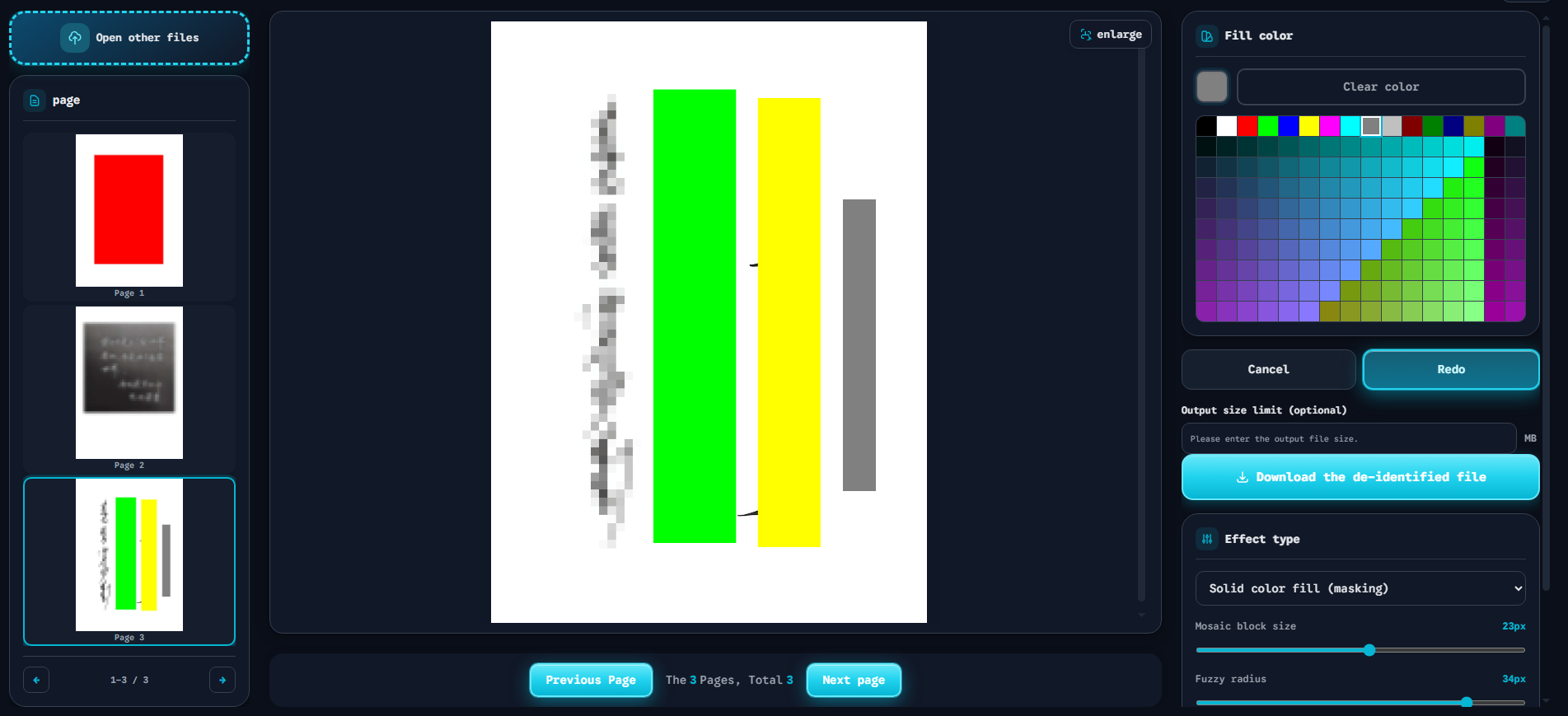
The interface above demonstrates what an enterprise-grade secure face blackout tool should provide. Key features visible in the screenshot:
- Precise bounding box manipulation — Users draw exact rectangles around each face. No imprecise auto-detection that misses partial faces.
- Right-hand configuration panel — Instant controls for Solid Color Fill (the opaque red block shown in the preview), Mosaic block size adjustment, and Fuzzy blur radius tuning.
- Zero backend reliance — All processing happens in the browser. No server uploads. No API calls. No data transmission.
This is the interface standard that every enterprise image redaction workflow should meet.
Why Zero-Log Client-Side Software Is Mandatory for Facial Redaction
The architecture of your redaction tool determines your data exposure risk. For biometric data, this is not a minor consideration. It is the difference between compliance and a catastrophic breach.
The Cloud SaaS Risk
Traditional cloud-based redaction services require you to upload sensitive biometric imagery to a third-party server. This creates a secondary data leak vulnerability:
- Server-side storage — Your facial data resides on infrastructure you do not control.
- Transmission interception — Data in transit can be intercepted by man-in-the-middle attacks.
- Insider threats — Server administrators may have access to uploaded files.
- Breach exposure — A single server compromise exposes all uploaded biometric data.
Uploading facial images to a third-party server to redact them defeats the entire purpose of de-identification. You are creating a new privacy risk while trying to eliminate an existing one.
The Client-Side Advantage
A 100% browser-based tool performs irreversible facial masking completely within local memory via HTML5 Canvas and WebAssembly. The advantages are absolute:
- Zero data transmission — Files never leave the user’s device. No upload. No API call.
- Zero server-side storage — No server exists to store, log, or leak the data.
- Zero third-party access — No vendor, administrator, or attacker can intercept the processing.
- Full regulatory compliance — Meets GDPR data minimization and CCPA security requirements.
Our ToolVX Redaction tool implements this exact architecture. All facial redaction occurs locally in the browser. No registration. No uploads. No logs. For teams comparing enterprise options, our software evaluation guide details the full feature comparison.
Conclusion & Compliance FAQ
Facial redaction is not optional for organizations handling biometric data. It is a legal requirement under GDPR, CCPA, and emerging global frameworks. The technical standard is clear: use irreversible pixel destruction via client-side processing. Anything less creates compliance risk and data exposure.
Compliance FAQ
Is facial redaction legally required under GDPR?
Yes, when processing biometric data for identification purposes. GDPR Article 9 classifies facial geometry as special category data. Organizations must either obtain explicit consent or apply irreversible de-identification before sharing. Proper facial redaction removes the identifiable link, transforming the data into a non-personal, compliant asset.
Can advanced AI reverse facial blurring?
It depends on the method. Low-radius Gaussian blur preserves enough facial geometry for AI models to reconstruct approximate features. Solid color fill and high-density mosaic destroy the pixel data entirely, making reconstruction mathematically impossible. For a detailed technical breakdown, read our analysis of redaction reversibility.
How do I redact multiple faces in a single document or PDF?
Use a tool that supports bounding box selection across multiple regions. Draw a box around each face, apply your chosen mask style (Solid Fill, Mosaic, or Blur), and export the flattened result. For PDFs, ensure the tool rasterizes and flattens the redaction layer to prevent layer removal. Our free browser-based tool handles multi-face redaction in both images and PDFs with zero server uploads.