
Freelancer Security: Redacting Invoices, Contracts & Client Data
Freelancers live in a paradox. Your portfolio needs to prove you have done real work for real clients鈥攂ut the evidence of that work often contains exactly the information you must never publish. Invoices list billing addresses and bank details. Contracts carry legal names, signature images, and confidential project scopes. Case studies screenshot emails, dashboards, and deliverables that embed third-party data you have no right to expose.
Uploading an unredacted invoice to Behance, LinkedIn, or your personal site is not a minor oversight. It is a data breach waiting to happen. Payment details can enable fraud. Client names tied to unreleased projects can violate NDAs. Even a partially visible contract clause can signal pricing structure to competitors. The solution is not to stop sharing your work鈥攊t is to redact aggressively, permanently, and locally before any file touches the public internet.
This guide walks through what freelancers should mask, which redaction techniques fit each type of sensitive content, and how to build a fast pre-publish workflow using a browser tool that never uploads your client documents to a server.
What Freelancers Accidentally Leak
The most dangerous leaks are the ones that look harmless. A portfolio screenshot might crop out a client’s logo but leave their email address visible in a notification bar. A PDF case study might black out a dollar amount in the body text while leaving the same figure in a chart axis label. Understanding the full surface area of client data in your files is the first step toward protecting it.
Invoices and payment records
Freelance invoices typically contain:
- Your client’s legal business name and billing address
- Your own bank account, routing, or payment-platform identifiers
- Invoice numbers that correlate to internal accounting systems
- Line items that reveal project scope, hourly rates, or volume discounts
- Tax identifiers where applicable
Any of these fields can enable social engineering, payment fraud, or competitive intelligence. Before sharing an invoice as proof of engagement, mask every field that is not essential to the story you are telling鈥攁nd often, the only field worth keeping is a generic project description with all identifiers removed.
Contracts and statements of work
Contracts add another layer. Signatures, even digital ones, are biometric-adjacent identifiers that should not appear in public portfolios. Effective dates, termination clauses, liability caps, and exclusivity terms are confidential by default. A redacted contract excerpt can demonstrate that you work under formal agreements without revealing the terms that make those agreements valuable.
Deliverable screenshots and exports
Designers, developers, and consultants frequently screenshot in-progress work. Those images may include CRM records, analytics dashboards, API keys in browser tabs, Slack messages with colleague names, or end-user data in staging environments. Treat every screenshot as guilty until inspected pixel by pixel.
Three Redaction Techniques and When to Use Them
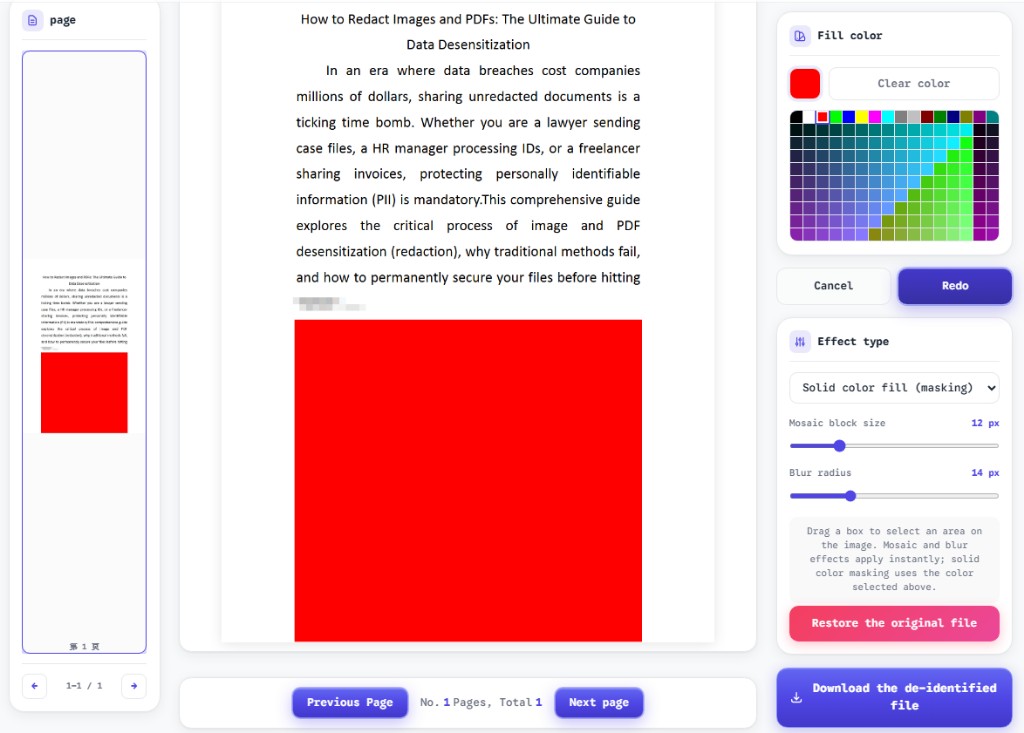
ToolVX’s browser redaction tool offers three core effects. Each destroys underlying pixels on export, but they communicate different levels of obscurity and suit different content types on invoices, contracts, and images.
Solid fill: maximum removal for identifiers
Solid fill replaces the selected region with an opaque color鈥攖ypically black or white. Use it for:
- Bank account and routing numbers
- Full street addresses
- Tax IDs and government identifiers
- Signature images
- Invoice numbers you do not want correlated publicly
Solid fill leaves no visual hint of what was underneath. For compliance purposes, it is the clearest signal that information was intentionally removed rather than accidentally obscured.
Gaussian blur: soft masking for faces and context
Blur reduces detail while preserving the general shape and color of a region. It works well when:
- A team photo or video still includes people who did not consent to publication
- You want to show that a dashboard existed without revealing metrics
- Background UI elements should appear present but unreadable
Increase blur radius until text is illegible even when squinting. Light blur that leaves character outlines recognizable is not redaction鈥攊t is a challenge.
Mosaic: structured data and tabular content
Mosaic pixelation breaks a region into blocks, destroying fine detail while maintaining the grid structure of tables and spreadsheets. Reach for mosaic when:
- Invoice line items need to disappear but row layout should remain visible
- Spreadsheet exports embedded in PDFs contain mixed public and private columns
- Numeric data in charts must be unreadable while axis structure stays apparent
Mosaic communicates “this data existed but was intentionally anonymized,” which is often preferable to a solid black rectangle across an entire table when you want the portfolio piece to look polished rather than damaged.
Redaction Targets by Document Type
Different freelancer artifacts carry different risks. Use this reference table as a starting checklist before any public upload.
| Document | Always redact | Usually redact | May keep (with care) |
|---|---|---|---|
| Invoice PDF | Bank details, tax IDs, full addresses | Client legal name, invoice number | Generic service description |
| Contract PDF | Signatures, party addresses, pricing | Project codenames, effective dates | High-level scope summary (rewritten) |
| Screenshot (PNG/JPG) | API keys, emails, account numbers | Client logos, user avatars | Generic UI chrome with no PII |
| Email export PDF | Header metadata (To, From, Date) | Message bodies with third-party names | Your own sanitized commentary |
When in doubt, redact more, not less. You can always describe the engagement in your own words without attaching the primary source document.
A Pre-Publish Workflow for Freelancers
Speed matters when you are assembling a portfolio piece on a deadline. The following workflow balances thoroughness with the five-to-ten-minute time budget most freelancers can afford per asset.
1. Decide what story the file tells
Before opening any tool, write one sentence: “This document proves I delivered X for Y industry.” Everything that does not serve that sentence is a redaction candidate. If your proof does not require showing a dollar amount, mask every dollar amount. If your proof does not require a client name, mask every client name鈥攅ven if the client said you could share it. Names age poorly; NDAs do not.
2. Open the file in a local browser tool
Navigate to the ToolVX redaction tool and upload your PDF or image. Processing happens entirely in your browser. There is no upload to a cloud server, no account creation, and no retention period during which your client’s invoice sits on someone else’s infrastructure. For freelancers bound by client agreements that prohibit third-party data processing, local-only tools are not a nice-to-have鈥攖hey are a contractual requirement.
3. Apply masks systematically
Work top to bottom, left to right. On invoices, mask the header block first (addresses, invoice numbers), then line items, then payment instructions in the footer. On contracts, mask signature blocks and party identification before tackling body clauses. On screenshots, scan all four corners and the edges鈥攏otification badges and browser tabs hide there.
4. Match technique to content
Use solid fill for structured identifiers, mosaic for tables and numeric grids, and blur for photographic or ambient content. Consistency across a single portfolio piece looks professional and signals deliberate anonymization to viewers who understand redaction norms.
5. Export, verify, and rename
Download the redacted file. Attempt to select text in masked PDF regions. Zoom to 200% and inspect edges for partial characters. Rename the file with a -redacted suffix and store the original in a client-restricted folder鈥攏ot in your public portfolio directory. Upload only the redacted copy.
Portfolio Scenarios: Before and After Thinking
Concrete scenarios help translate abstract redaction principles into action.
Case study: branding project invoice
You want to show that a retail client paid for a full brand identity package. The invoice proves scope and professionalism. Redact the client’s legal name (replace with “Fortune 500 Retail Client” in your caption), mask all addresses, remove invoice and PO numbers, and mosaic line items so individual rates are unreadable. Keep the document layout visible so the viewer sees a formal invoice structure without accessing private data.
Case study: development contract excerpt
You want to demonstrate experience with enterprise SaaS agreements. Redact both signature blocks with solid fill, mask party names and addresses in the preamble, and blur any exhibit screenshots that show staging data. Write a summary paragraph in your own words describing deliverables鈥攄o not rely on unredacted contract text to tell the story.
Case study: analytics dashboard screenshot
You captured a results slide showing a 40% improvement metric. The metric is your headline; everything else is risk. Mosaic the underlying data table, blur user segments that contain fewer than a thousand users (small-n segments can be re-identifying), and crop or mask browser chrome that shows account names or URLs.
Legal and Professional Considerations
Redaction supports confidentiality, but it does not replace permission. Consider the following before publishing any client-derived material:
- Review your contract. Many freelance agreements require written approval before using client work in marketing materials, even when redacted.
- Check NDAs. Some NDAs prohibit showing document structure, not just content. A heavily redacted contract might still violate terms if the client can recognize their own template.
- Understand that redaction is one-way. If you destroy data in your only copy, you cannot recover it. Keep an unredacted archive in secure storage.
- Document your process. If a client asks how you protect their data, being able to describe local browser redaction with permanent flattening is a credible, professional answer.
None of this is legal advice鈥攂ut ignoring these layers turns a portfolio update into a relationship-ending mistake.
Building a Freelancer Redaction Kit
Prepare once so that every future portfolio upload is fast.
Folder structure
clients/{name}/originals/鈥?unredacted source files, access restrictedclients/{name}/redacted/鈥?export copies safe for sharingportfolio/ready/鈥?only files that passed verification
Naming conventions
Use filenames like invoice-acme-2026-redacted.pdf so you never confuse source and sanitized versions. Never name a redacted file final.pdf without a qualifier.
Effect presets mental model
- Solid fill 鈫?identifiers, signatures, addresses
- Mosaic 鈫?tables, line items, numeric grids
- Blur 鈫?faces, ambient UI, background context
Verification habit
After every export, spend sixty seconds attempting text selection and scanning page edges at high zoom. This habit catches more leaks than any automated tool because you know what your client’s data looks like.
Why Local Processing Matters for Client Trust
Cloud-based “free PDF editors” often upload your file to a remote server for processing. For personal todo lists, that trade-off might be acceptable. For client invoices and contracts, it is not. Data processing agreements, GDPR Article 28 processor requirements, and plain professional courtesy all point the same direction: client documents should stay on your machine.
Browser-local redaction means your invoice PDF is rendered in memory on your device, masks are applied on a canvas in your browser, and the export is generated without a network round trip carrying the source file. You can describe this architecture to clients who ask about your security practices, and you can work on airplanes, in co-working spaces, and on hardware you do not fully control鈥攚ithout signing your client’s data over to a third party.
Common Freelancer Redaction Mistakes
Learn from patterns that have burned others:
- Publishing the wrong file version. Always check the filename before upload. Keep redacted exports in a separate folder from originals.
- Cropping instead of redacting. Cropping removes visible content but leaves metadata intact in some formats. Redact and export for permanent removal.
- Leaving metadata in PDF exports. If your source PDF contains author names or embedded revision history, consider whether the export process flattens metadata. When in doubt, open the redacted file’s document properties before sharing.
- Showing too much for “authenticity.” A portfolio piece does not need a real invoice number to be credible. Generic labels often look more professional than heavily masked real documents.
- Forgetting embedded images. Contracts and invoices may embed logos with embedded contact details. Mask embedded images separately from surrounding text.
Protect Your Clients and Your Reputation
Freelancer security is not about hiding your success鈥攊t is about sharing proof of work without exporting the private data that made that work possible. Invoices, contracts, and deliverable screenshots all deserve a disciplined redaction pass with solid fill for identifiers, mosaic for structured data, and blur for visual context鈥攁pplied locally, verified manually, and exported as a permanently flattened file.
Before your next portfolio update, open the Free Client-Side Image and PDF Redaction Tool, upload your client documents, and mask what should never reach the public web. Your clients trust you with their data. Redaction is how you honor that trust while still showing the world what you can do. For a full software comparison, see our image redaction software review.