
Best Image Redaction Software in 2026: Secure Ways to Mask Sensitive Data
Finding the right image redaction software shouldn’t mean downloading bulky, expensive desktop apps or risking your data on shady web servers. In 2026, the best tools run entirely in your browser. They require zero installation. They store nothing on external servers.
This guide breaks down what to look for. It explains why browser-based tools are replacing desktop software. And it introduces a free, secure option that meets every enterprise requirement.
Key Features to Look For in Image Redaction Software
Not all redaction tools are created equal. When evaluating image redaction software, focus on these three critical criteria:
1. Irreversible Masking
True redaction destroys the original pixel data. It does not merely cover it up. Look for tools that:
- Overwrite pixels permanently — Solid color fills that replace original data at the byte level.
- Scramble pixel patterns — High-density mosaic that makes reconstruction mathematically impossible.
- Strip metadata — Remove EXIF data, GPS coordinates, and camera identifiers from the output file.
Any tool that uses translucent overlays or reversible layers fails this test. For a technical breakdown of why reversible masking is dangerous, see our investigation into redaction reversibility.
2. Multi-Format Support
Your workflow likely involves multiple file types. The best image redaction software handles:
- Raster images — JPG, PNG, WebP, BMP.
- Vector documents — PDF with embedded images and text layers.
- Batch processing — Apply the same redaction rules across multiple files at once.
3. Data Privacy Architecture
This is the most important factor. There are two fundamentally different architectures:
| Architecture | How It Works | Privacy Risk |
|---|---|---|
| Server-side | Files upload to a remote server for processing | High — data stored on third-party infrastructure |
| Client-side | Processing happens in your browser via WebAssembly/Canvas | Zero — files never leave your device |
Always choose client-side image redaction software for sensitive corporate or personal data. For a step-by-step workflow, read our complete guide to photo redaction.
Why Browser-Based Client-Side Tools Are Replacing Desktop Software
The image redaction software market is shifting rapidly in 2026. Here is why:
The Desktop Software Problem
Traditional desktop apps come with significant overhead:
- Installation friction — Requires admin privileges and IT approval.
- Update cycles — Security patches lag behind browser-based alternatives.
- Platform lock-in — Windows-only or Mac-only tools limit team flexibility.
- License costs — Enterprise seats can cost $50-$200 per user per year.
The Browser-Based Advantage
Modern web tools leverage WebAssembly and HTML5 Canvas to achieve desktop-level performance:
- Zero installation — Open a URL and start redacting immediately.
- Cross-platform — Works on Windows, Mac, Linux, and mobile browsers.
- Always up to date — No manual updates; the latest version loads on every visit.
- Zero-log privacy — No server means no data retention, no logs, no leaks.
- Instant speed — Client-side rendering processes files in milliseconds.
For most teams, a browser-based image redactor now outperforms legacy desktop software on every metric except one: offline access. If you need offline capability, desktop apps still win. For all other use cases, the browser is the future.
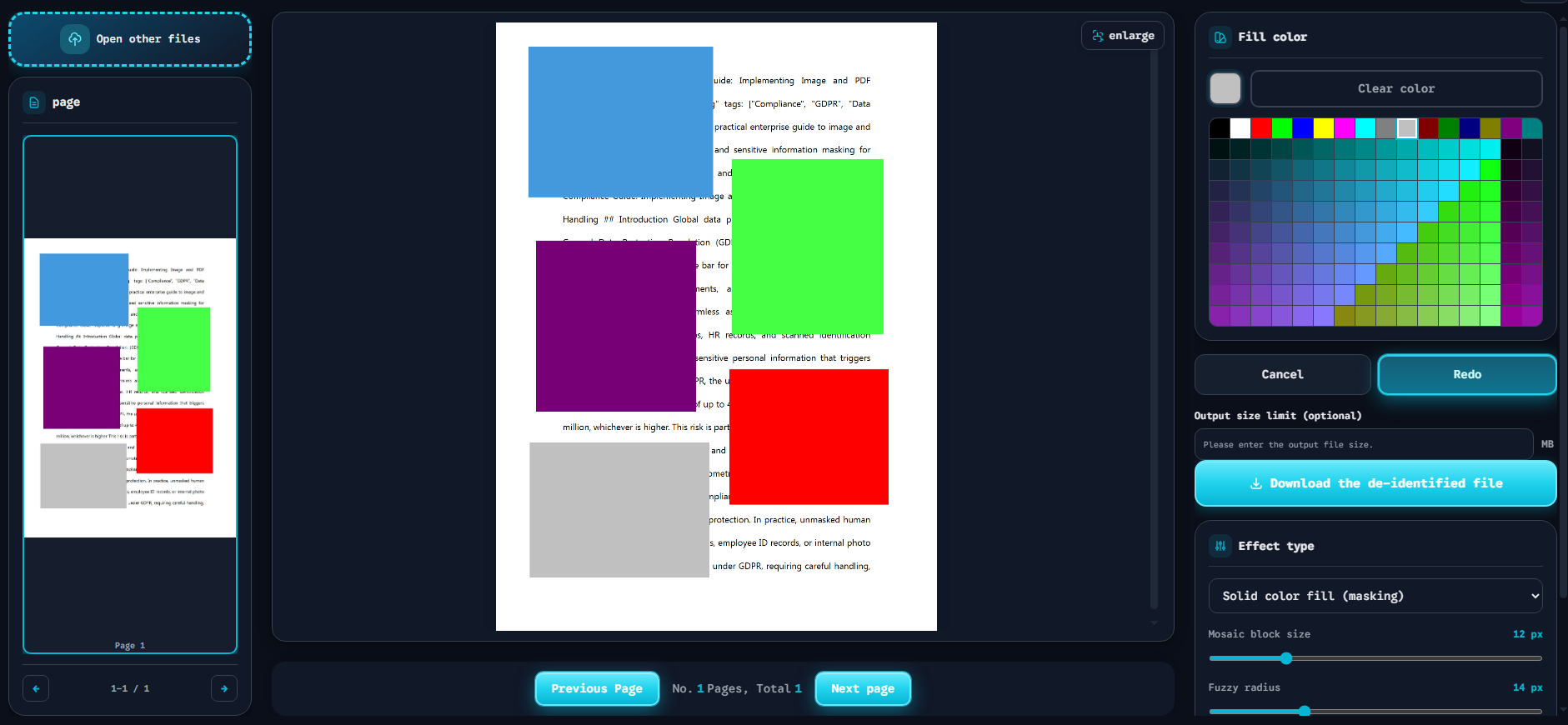
The screenshot above shows what a modern secure document blackout tool should look like. Notice the key features:
- Left sidebar — Page thumbnails for quick navigation across multi-page PDFs.
- Center canvas — The document preview with color-coded redaction blocks applied in real time (blue, green, purple, red, gray).
- Right control panel — Instant toggles for Solid Color Fill (shown as the active “Solid color fill (masking)” option), Mosaic block size slider (12 px), and Fuzzy radius slider (14 px).
- Action buttons — Download the de-identified file exports the final result. Cancel and Redo provide undo/redo control.
This is the interface standard that every bulk photo redaction tool should meet in 2026.
Meet Our Free, Secure Image Redaction Software
We built the Free Client-Side Image and PDF Redaction Tool to solve the exact problems described above. Here is what sets it apart:
Enterprise-Grade Security, Zero Cost
- 100% client-side processing — Your files never upload to a server. All redaction happens in your browser using WebAssembly and Canvas APIs.
- No registration required — No email, no account, no tracking. Open the tool and start working.
- Completely free — No paywalls, no feature gates, no watermarks on output files.
What You Can Redact
Our free text masking software handles all common use cases:
- Corporate text — Black out financial figures, internal codes, and confidential annotations.
- Faces and identities — Apply solid fill or mosaic to remove personally identifiable features.
- Signatures and stamps — Erase handwritten signatures and official seals from scanned documents.
- Metadata — Strip EXIF and document properties from the exported file.
How to Get Started
- Navigate to the Start Redaction page.
- Drop your image or PDF onto the canvas.
- Draw bounding boxes around the areas you want to mask.
- Choose your mask style: Solid Fill, Mosaic, or Blur.
- Click Download the de-identified file.
The entire workflow takes under 30 seconds. No software to install. No data to risk.
Conclusion & FAQ
The image redaction software landscape has evolved. Browser-based, client-side tools now offer the security of desktop apps with the convenience of web access. For teams handling sensitive data, choosing a zero-log, no-registration tool is no longer a luxury — it is a compliance necessity.
Frequently Asked Questions
Is there a free image redaction software?
Yes. The Free Client-Side Image and PDF Redaction Tool is completely free with no registration required. It performs all processing client-side, so there are no server costs to pass on to users. No watermarks, no feature limits, no hidden fees.
Can redacted images be uncovered?
It depends on the method. Solid color fill and high-density mosaic are irreversible — the original pixels are permanently destroyed. Low-radius blur and translucent overlays can potentially be reversed by AI tools. Always use solid fill or mosaic for sensitive data. Learn more in our deep dive on redaction reversibility.
Does this software support PDF masking?
Yes. Our secure document blackout tool handles both images (JPG, PNG, WebP) and PDFs. For PDFs, the redaction area is rasterized and the layer is flattened, making the masking permanent and irreversible.