
The Ultimate Guide to Face Redaction: Protecting Identity in Images and Documents
Biometric privacy laws are tightening worldwide. Facial data is now classified as sensitive personal information under major regulations. In this comprehensive guide, we will explore the best practices of face redaction to ensure your files remain secure and fully compliant.
Whether you handle HR records, customer photos, or legal documents, proper face redaction is no longer optional. It is a legal and ethical necessity.
What is Face Redaction and Why Is It Legally Mandatory?
Face redaction is the process of permanently destroying identifiable facial pixels in an image or document. Unlike casual blurring, true redaction makes the original face data unrecoverable.
Facial data is classified as sensitive biometric information under three major laws:
- GDPR (European Union) — Requires explicit consent for biometric data processing.
- CCPA (California) — Grants consumers the right to know what biometric data is collected.
- APPI (Japan) — Mandates strict handling of personal identifiers including facial features.
Organizations that share photos publicly must apply face masking before distribution. Failure to do so can result in severe fines. GDPR penalties alone can reach €20 million or 4% of global annual revenue.
Corporate compliance teams use image de-identification tools to automate this process. The goal is simple: remove all personally identifiable facial data before any external sharing occurs. For teams evaluating enterprise-grade solutions, our image redaction software comparison guide details the key features that separate professional tools from consumer apps.
The Technical Pitfalls of Poor Face Masking
Not all face masking methods are equal. Many common approaches create a false sense of security.
Why Casual Methods Fail
| Method | Risk Level | Why It Fails |
|---|---|---|
| Translucent emoji stickers | Critical | Original pixels remain visible underneath |
| Partial blur (low radius) | High | AI algorithms can reverse light blurs |
| Reversible vector overlays | Critical | Layers can be removed in image editors |
| Semi-transparent color fills | High | Color inversion reveals the original face |
Secure face redaction must use one of two approaches:
- Irreversible pixel-scrambling algorithms — Mosaic or pixelation that destroys original data at the byte level.
- Complete solid color replacement — Full opaque blocks that permanently overwrite facial pixels.
Any method that preserves the underlying pixel data is not true redaction. It is merely concealment. For a technical deep-dive into why reversible masking fails, see our investigation into removing redaction from images.
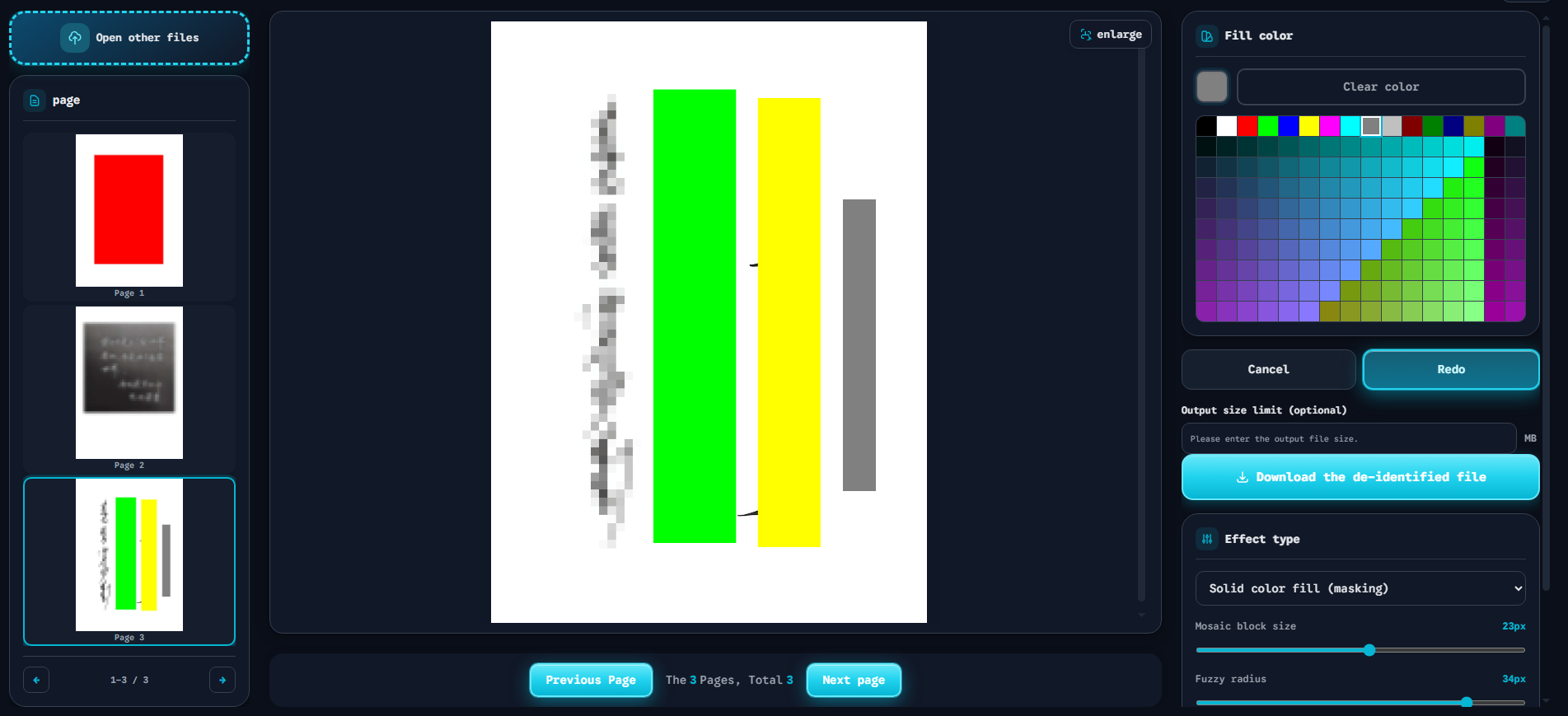
The interface above demonstrates a professional face masking software workflow. Users draw bounding boxes around faces and choose from three secure mask styles:
- Solid Fill — The red block shown in the preview. This is the most secure option. It completely overwrites facial pixels with an opaque color.
- High-Density Mosaic — Pixel-scrambling that destroys facial features at the pixel level.
- Fuzzy Blur — Gaussian blur applied at a high radius. Less secure than solid fill but acceptable for non-sensitive contexts.
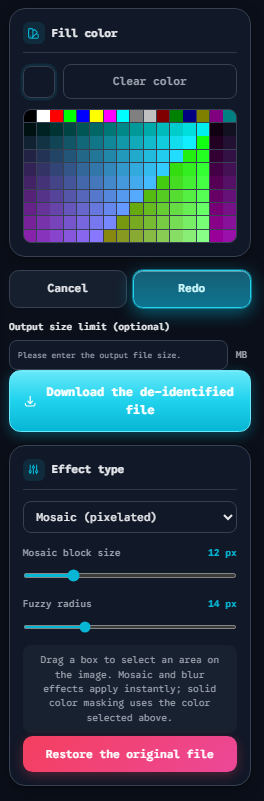
The panel above shows the three mask style controls in detail. Users can pick a custom Fill color for solid masking, adjust the Mosaic block size (shown at 12 px), and tune the Fuzzy radius (shown at 14 px) for blur effects. A Download the de-identified file button exports the final result, while Restore the original file lets users start over.
Implementing Face Redaction via Secure, Client-Side Tools
The safest way to blur faces in photos is to use a tool that never uploads your files to a server.
The Risk of Server-Side Editors
Many online image editors store uploaded files on their servers. Even if they claim to delete files after processing, you have no way to verify this. Your biometric data could be retained, leaked, or sold.
Why Client-Side Processing Matters
A client-side face redaction tool performs all computation inside your browser. Your image data never leaves your device. This approach offers three key advantages:
- Zero data exposure — No uploads means no server-side storage risk.
- Instant processing — Client-side rendering is faster than waiting for server round-trips.
- Full compliance — Meets GDPR and CCPA requirements for data minimization.
How to Redact Faces Securely in 4 Steps
- Open the tool — Navigate to the Start Redaction page in your browser.
- Upload your file — Drop an image or PDF directly onto the canvas.
- Select face regions — Draw bounding boxes around each face you want to mask.
- Choose mask style and download — Pick Solid Fill, Mosaic, or Blur. Then export the clean file.
The entire process happens in your browser. No registration. No uploads. No data retention.
Conclusion & FAQ
Proper face redaction is a critical component of modern data privacy compliance. Whether you are an HR professional, a legal team member, or a developer building privacy features, understanding the technical requirements for permanent facial data masking is essential.
Use tools that perform permanent face blur through irreversible pixel destruction. Avoid methods that merely conceal data without destroying it. And always prefer client-side processing to protect biometric data from server-side exposure.
Frequently Asked Questions
Can face redaction be reversed by AI?
Solid fill redaction cannot be reversed. The original pixels are permanently overwritten. Low-radius blur and partial masks may be reversible by advanced AI models. Always use solid fill or high-density mosaic for sensitive data. Learn more about why redaction reversibility matters.
Is blurring a face enough for compliance?
It depends on the blur intensity. A high-radius Gaussian blur that destroys facial features may meet basic compliance requirements. However, solid color replacement is the gold standard. It provides the strongest guarantee of irreversible de-identification.
How do I securely redact faces in a PDF?
PDFs require special handling. Simple image overlays in PDF editors can often be removed. Use a dedicated tool that rasterizes the redaction area and flattens the PDF layer. Our online redaction tool handles both images and PDFs with irreversible, client-side processing.