
The Danger of “Fake” Redaction: Why Highlighting Is Not Enough
Every week, security researchers publish new examples of organizations that believed they had protected sensitive information in a PDF鈥攐nly to discover that a curious recipient recovered names, account numbers, or medical details with a few clicks. The failure mode is almost always the same: someone drew a black rectangle over visible text and assumed the document was safe. That assumption is dangerous, and in regulated industries it can trigger audits, fines, and lasting reputational damage.
Real redaction is not a visual trick. It is the irreversible destruction of the underlying data that makes recovery impossible. This article explains why superficial edits fail, where hidden data still leaks, and how browser-local tools like the ToolVX redaction workspace apply permanent pixel-level changes without uploading your files to any server.
What “Fake” Redaction Actually Means
Fake redaction鈥攕ometimes called cosmetic or superficial redaction鈥攟ccurs when a user places an opaque shape, highlight, or annotation on top of sensitive content without removing the original text or image data from the file. The black box looks convincing on screen and in print, but the bytes underneath remain intact.
Common techniques that produce fake redaction include:
- Drawing a filled rectangle in a PDF editor without flattening or burning the change into the page content stream
- Using the highlighter tool set to black color over confidential paragraphs
- Adding a text box with a black background on top of existing text
- Exporting a screenshot of a redacted view while the source PDF still contains recoverable layers
- Applying redaction marks in software that stores “redacted” content in undo history or revision metadata
Each of these methods changes appearance, not substance. The sensitive payload is still present somewhere in the document structure, waiting for the right tool to expose it.
Why the PDF Text Layer Survives Visual Covers
PDF files are not flat images. They are structured containers that can hold multiple representations of the same information simultaneously. A typical page might include:
- A content stream with drawing instructions for text, vectors, and embedded images
- Font resources that map character codes to glyphs
- Optional content groups and layers that can be toggled on or off
- Annotations such as highlights, stamps, and redaction notes stored separately from page paint operations
- Embedded attachments and file-level metadata that never appear on the printed page at all
When you drop a black rectangle as an annotation or even as a vector path, many viewers render it above the text for display purposes. However, the original text objects often remain in the file. Select-all, copy-paste, search, and accessibility extraction can still reach them. Forensic utilities and open-source PDF parsers routinely recover “hidden” strings in seconds.
This is the core misunderstanding behind fake redaction: if the sensitive pixels or glyph data still exist in the file, the document is not redacted.
Metadata Leaks: Invisible Paths to Sensitive Data
Even when visible text appears covered, PDFs frequently leak information through channels that never show up in a print preview. Compliance reviewers and incident response teams increasingly check these secondary surfaces because attackers do.
Document Information Dictionary
The PDF Info dictionary can store the document title, author, subject, keywords, creator application, and modification timestamps. A contract exported from a case management system might embed a patient name in the Title field while the body text looks anonymized. Regulatory frameworks such as GDPR and HIPAA treat improperly minimized metadata as a disclosure event, not a formatting oversight.
XMP and Custom Properties
Extensible Metadata Platform (XMP) packets attach to PDFs and images alike. They may contain workflow tags, user names, geolocation from a camera, or project identifiers. Redacting body content does nothing to these packets unless you explicitly strip or rewrite them at export time.
Embedded Files and Attachments
PDF supports embedded file streams鈥攐riginal spreadsheets, source images, or prior document versions bundled inside the container. A “redacted” report might still carry an unredacted attachment accessible through the attachments panel in Adobe Acrobat or programmatic extraction.
Comments, Review History, and Incremental Saves
Collaborative review leaves comment threads, reply chains, and prior revisions in the file. Incremental update saves append new objects without deleting old ones, which means earlier versions of a paragraph can persist in the byte stream. An attacker with a hex editor or specialized recovery script can reconstruct superseded content.
OCR and Hidden Text Layers
Scanned PDFs processed with optical character recognition often contain an invisible text layer aligned under the scan image. Covering the scan visually does not remove the OCR text, which remains searchable and copyable.
The lesson is straightforward: redaction must address the entire file artifact, not only what you see in the viewport.
Compliance Reviews Expose Superficial Edits Quickly
Legal, healthcare, and financial teams run structured validation before accepting redacted materials. A superficial edit that passes casual human inspection often fails automated checks within minutes.
Typical review steps include:
- Full-text search for known identifiers such as Social Security numbers, IBANs, or medical record numbers
- Copy-paste attempts from allegedly redacted regions
- Metadata extraction with standard forensic toolkits
- Comparison against source systems to detect mismatches between visible and embedded fields
- Accessibility tree inspection, which can surface text that visual overlays obscure
When fake redaction is discovered after submission, consequences range from rejected filings and delayed transactions to mandatory breach notifications. For government contractors and healthcare providers, the cost is not merely embarrassment鈥攊t is measurable liability.
| Review technique | Fake redaction (black box overlay) | True pixel destruction |
|---|---|---|
| Visual inspection | Often passes | Passes |
| Copy-paste from region | Frequently fails | Passes |
| Full-text search | Frequently fails | Passes |
| Metadata extraction | Frequently fails | Passes (when stripped at export) |
| Forensic layer recovery | Frequently fails | Passes |
| Regulatory defensibility | Weak | Strong when documented |
Permanent Pixel Destruction: What Real Redaction Requires
True redaction鈥攕ometimes called burn-in or destructive redaction鈥攔eplaces sensitive regions with new pixel values and removes or overwrites the underlying content so it cannot be reconstructed from the distributed file. The goal is cryptographic practicality: recovery should require capabilities far beyond what normal recipients possess, ideally approaching impossibility.
Effective permanent redaction includes several technical properties:
Content Is Removed, Not Covered
The sensitive text objects, image samples, or vector data must be deleted from the content stream or overwritten in the rasterized output. The redacted region should contain only the replacement effect鈥攕olid fill, mosaic tiles, or blurred pixels鈥攚ith no parallel hidden copy.
Effects Are Applied at the Pixel Level
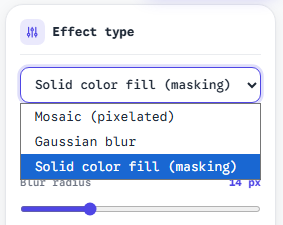
Gaussian blur, mosaic (pixelation), and solid fill are not equivalent in every threat model, but all three can be legitimate when implemented as rendered output rather than as non-destructive filters. Blur smears local color information. Mosaic reduces spatial resolution in the masked area. Solid fill replaces the region with a uniform color, eliminating underlying detail entirely. For highest assurance on text, solid fill or aggressive mosaic is often preferred because blur can sometimes be partially reversed with deconvolution attacks on low-entropy regions.
The Exported File Is Flattened
Interactive elements, hidden layers, and annotation objects should not survive export. The deliverable should behave like a single painted page per sheet when opened in a standards-compliant viewer.
Metadata Is Minimized Deliberately
Export settings should clear or neutralize identifying metadata where policy requires it. Document the steps so compliance officers can reproduce your workflow.
Why Browser-Local Processing Matters for Sensitive PDFs
Uploading a confidential PDF to a cloud redaction service introduces a separate risk: your unredacted source file transits the internet and rests on someone else’s infrastructure, however briefly. For many organizations, that alone violates data handling policy.
Browser-local redaction keeps the entire workflow on your device:
- Files are read from disk into memory inside your browser tab
- Redaction geometry and effect settings are applied with client-side rendering
- The sanitized PDF or image is generated locally and downloaded directly to your machine
- No server-side storage, no account-linked document retention, no third-party training on your content
This architecture aligns with data-minimization principles under GDPR and reduces the attack surface compared with cloud upload pipelines. It also means you can redact air-gapped or policy-restricted materials on a standard workstation without installing enterprise desktop suites.
The ToolVX browser redaction tool implements this model for PDFs and images. You select regions interactively, choose Gaussian blur, mosaic, or solid fill, and export a flattened result鈥攚ithout creating an off-device copy of your source material.
How ToolVX Applies Destructive Redaction in the Browser
ToolVX treats redaction as a rendering problem with a privacy constraint: processing must never leave the tab. When you mark a region on a PDF page or photograph, the tool composites the chosen effect into the page bitmap used for export. The output file reflects those pixels, not a reversible overlay sitting above intact text.
Choosing the Right Effect for the Threat Model
- Solid fill 鈥?Best when you need maximum certainty that textual detail is gone. Use black or a neutral gray for formal legal submissions.
- Mosaic 鈥?Useful when you want to obscure identifiers while signaling that an area was intentionally masked. Strong spatial downsampling resists casual reading.
- Gaussian blur 鈥?Appropriate for faces or backgrounds in images where a naturalistic transition is desirable. Combine with sufficiently large mask areas; thin blur over high-contrast text is weaker than fill or mosaic.
Multi-Page PDF Workflows
Contracts, medical bundles, and discovery productions rarely fit on a single page. A credible local tool must let you navigate page thumbnails, apply consistent masks across recurring headers or footers, and export the full document in one pass. ToolVX supports multi-page PDF redaction with the same local-only guarantee on every sheet.
Verification Habits Before You Share
Before distributing a redacted PDF, adopt a short verification ritual:
- Open the exported file in a viewer you do not use for editing.
- Attempt to select and copy text from masked regions.
- Run search for a known identifier that appeared in the original.
- Inspect document properties for unexpected titles or author strings.
- If policy requires, run your organization’s forensic script or DLP scanner.
These steps take minutes and prevent costly false confidence.
Fake Redaction in the Wild: Patterns to Avoid
Security mailing lists document recurring failure patterns. Learning to recognize them helps teams train staff before an incident occurs.
The Annotation-Only Black Bar
A user adds a shape annotation, sets fill to black, and flattens visually by zooming to 100 percent without exporting a flattened PDF. Annotations remain detachable in many workflows.
The “Print to PDF” Assumption
Printing to a new PDF can rasterize pages, which sometimes helps, but driver settings, vector preservation, and hidden text layers produce inconsistent results. It is not a controlled redaction method and should not replace deliberate destructive export.
The Redacted Cover Page with Live Body
Teams redact an executive summary while leaving detailed appendices untouched, or they redact page one but forget embedded attachments. Attackers read the path of least resistance.
Screenshot Cropping
Cropping a screenshot removes off-screen content from the image file but does not sanitize metadata, and it is impractical for multi-page legal PDFs. It also tends to reduce evidentiary quality.
Building a Defensible Redaction Policy
Organizations that handle sensitive PDFs should document a minimal standard:
- Define authorized tools 鈥?Prefer local, destructive redaction utilities with verifiable export behavior.
- Prohibit annotation-only masking for external distribution.
- Require effect selection guidelines 鈥?e.g., solid fill for account numbers, mosaic for faces in internal drafts.
- Mandate verification steps before submission to courts, insurers, or clients.
- Train on metadata risks so staff clear or review document properties.
- Retain audit notes describing what was redacted and which tool version produced the file, without retaining the unredacted source in shared drives.
Individual professionals鈥攆reelancers, researchers, journalists鈥攂enefit from the same discipline even without a formal compliance department. Your reputation is tied to whether recipients can recover what you claimed to remove.
Conclusion: Appearance Is Not Security
Highlighting is not redaction. Black boxes that float above intact text layers are not redaction. Uploading confidential material to an opaque cloud service is not the same as controlling your own export pipeline. Real redaction destroys sensitive content at the pixel and object level, produces a flattened artifact, and stands up to search, copy, and forensic review.
If you work with PDFs that contain personal data, financial identifiers, health information, or sealed discovery material, treat every export as a security decision. Use a workflow that keeps files on your device and writes irreversible changes into the distributed document. Start with the Free Client-Side Image and PDF Redaction Tool to apply Gaussian blur, mosaic, or solid fill locally — then verify the result before anyone else opens the file. For a full analysis of why reversible masking fails, see our investigation into redaction reversibility.
The difference between fake and real redaction is not aesthetic. It is whether the secret still exists in the bytes you hand to the world.